我的书签
我的书签
 添加书签
添加书签 移除书签
移除书签Bee Watch

Bee Watchは、Goプログラミング言語のための対話型デバッガです。
機能
- Use
Critical,InfoandTracethree levels to change debugger behavior. Display()variable values orPrintf()with customized format.- User-friendly Web UI for WebSocket mode or easy-control command-line mode.
- Call
AddWatchVars()to monitor variables and show their information when the program callsBreak(). Configuration file with your customized settings(
beewatch.json).デバッガの動作を変更するために
CriticalとInfoとTraceの3つのレベルを使用してください。Display()変数の値やprintf ()カスタマイズ形式で。- のためのユーザーフレンドリーなWeb UIのWebSocketモードまたは簡単コントロールコマンドラインモード。
AddWatchVars()を呼び出して自分の情報を変数を監視し、表示するためにAddWatchVarsを呼び出します。- カスタマイズされた設定で設定ファイルsettings(
beewatch.json)。
インストール
Bee Watch is a “go get” able Go project, you can execute the following command to auto-install:
Bee WatchはGOプロジェクト、次のコマンドを実行することができ、go get自動インストールです:
go get github.com/beego/beewatch
Attention This project can only be installed by source code now. 注意 このプロジェクトは、ソースコードをインストールすることだけできます。
クイックスタート
使用方法
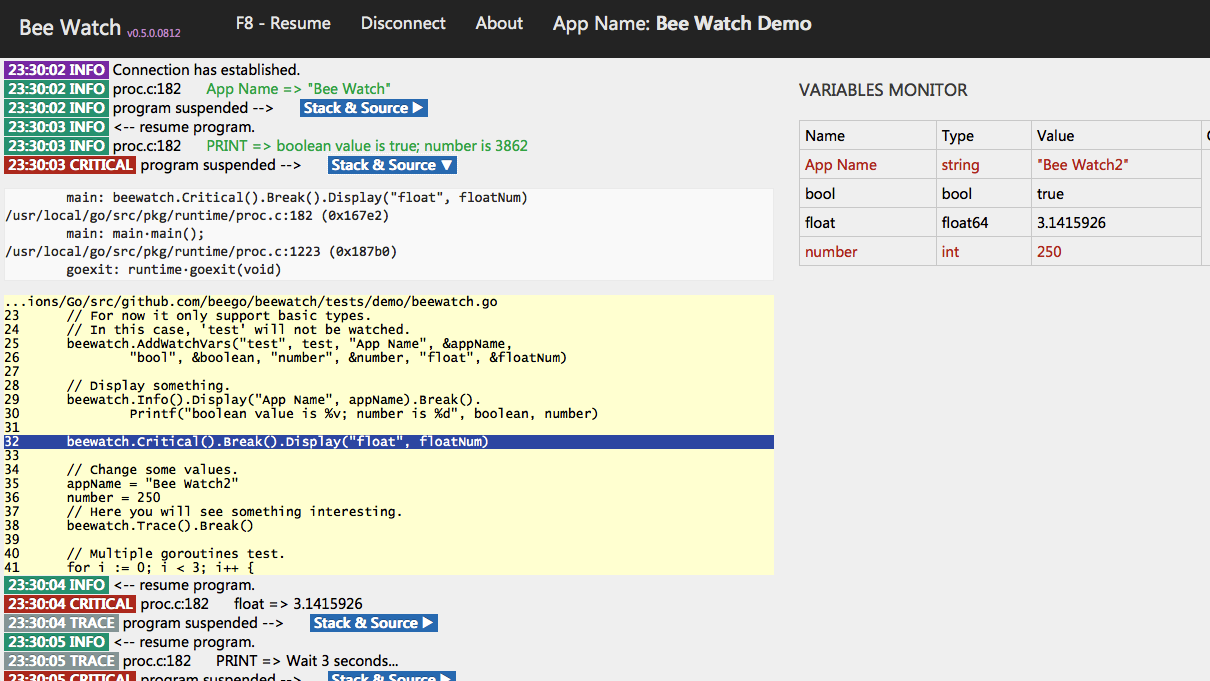
package mainimport ("time""github.com/beego/beewatch")func main() {// Start with default level: Trace,// or use `beewatch.Start(beewatch.Info())` to set the level.beewatch.Start()// Some variables.appName := "Bee Watch"boolean := truenumber := 3862floatNum := 3.1415926test := "fail to watch"// Add variables to be watched, must be even sized.// Note that you have to pass the pointer.// For now it only supports basic types.// In this case, 'test' will not be watched.beewatch.AddWatchVars("test", test, "App Name", &appName,"bool", &boolean, "number", &number, "float", &floatNum)// Display something.beewatch.Info().Display("App Name", appName).Break().Printf("boolean value is %v; number is %d", boolean, number)beewatch.Critical().Break().Display("float", floatNum)// Change some values, must be even sized.appName = "Bee Watch2"number = 250// Here you will see something interesting.beewatch.Trace().Break()// Multiple goroutines test.for i := 0; i < 3; i++ {go multipletest(i)}beewatch.Trace().Printf("Wait 3 seconds...")select {case <-time.After(3 * time.Second):beewatch.Trace().Printf("Done debug")}// Close debugger,// it's not useful when you debug a web server that may not have an end.beewatch.Close()}func multipletest(num int) {beewatch.Critical().Break().Display("num", num)}
Connect
Bee Watch debugger is automatically started on http://localhost:23456 when you use WebSocket mode, you can change port and other configuration by editing beewatch.json(copy default setting from Bee Watch source folder).
Bee Watchデバッガが自動的に開始され、[http://localhost:23456](http://localhost:23456)**WebSocket**モードでは、`beewatch.json`を編集することにより、ポートおよびその他の設定を変更することができます使用すると、Bee Watchソースフォルダからデフォルトの設定をコピーしてください)。
例およびAPIドキュメント
お使いのブラウザがWebSocketををサポートしている必要があり、MacおよびWindows上のChrome、Safari、Firefoxでテストされています。
! [ビーウォッチデモ] ( https://github.com/beego/beewatch/blob/master/tests/images/demo_beewatch.png?raw=true )